A website security checklist protects your business with five habits: HTTPS, regular updates, strong logins, tested backups and limited access. Most breaches begin with one small gap that stayed open too long. Therefore, closing those gaps early is the cheapest security you can buy.
The call comes at 3am. A customer’s card details appeared on a forum. The owner never heard of two-factor login. As a result, months of customer trust have evaporated by morning.
Peace That Protects, the fifth pillar of Digital Intent, exists to make sure that call never comes.
Key Takeaways
- Most breaches start with a small, ignored gap.
- HTTPS and two-factor login come first.
- Updates and backups need a routine.
- Give each person only the access they need.
The Moment Before the Call
Website security checklist: a short list of habits that close the gaps attackers use most, from weak passwords to untested backups.
Every breach has a moment before it, a small gap that stayed open a little too long. An unpatched plugin. A reused password. A backup nobody tested. None of these feel urgent, right up until they are.
What Would Have Prevented It: Your Website Security Checklist
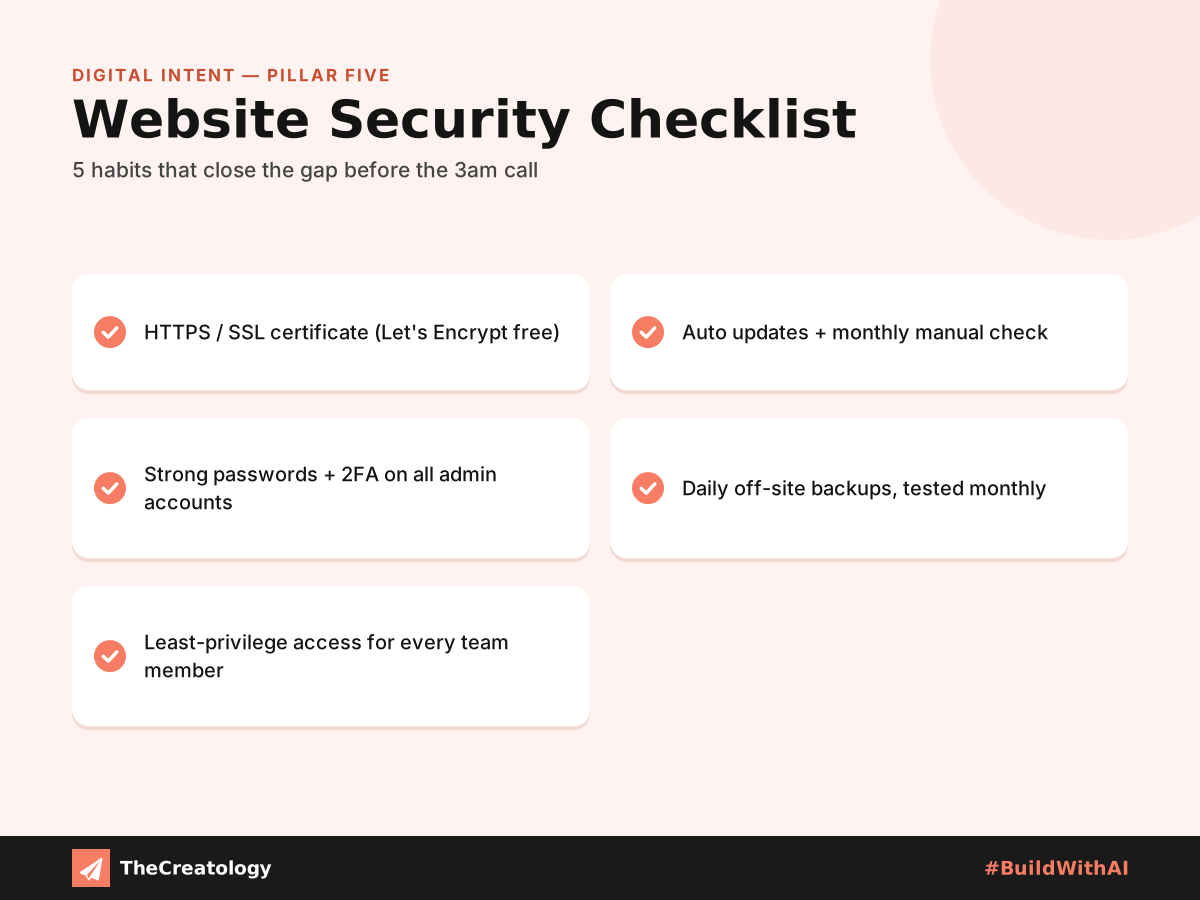
1. An SSL Certificate
Every website needs HTTPS, not just online stores. Most hosts now offer free certificates through Let’s Encrypt.
2. Religious Software Updates
Outdated plugins and themes are a common cause of website hacks. So, enable automatic updates where possible, and check by hand each month regardless.
3. Strong, Unique Passwords
Password managers create and store complex passwords with ease. Also, two-factor login on every admin account closes the door the 3am call walked through.
4. Automatic, Tested Backups
Schedule daily backups stored off-site, away from the main server. Then, test a restore regularly. An untested backup is a hope, not a plan.
5. Deliberate Access Limits
Give team members only the permissions their role needs. Otherwise, blanket admin access creates a door that nobody remembers leaving open.
Updates matter beyond the dashboard, too. For example, read why updating WordPress won’t protect you from PHP flaws. Likewise, see how a security fix can expose your site if you install it carelessly.
The Cost of the Call That Does Come
Lost rankings: compromised websites can lose their Google rankings. As a result, months of SEO effort vanish silently.
Legal risk: customer data leaks can also bring liability under India’s data protection law.
India’s national cyber agency, CERT-In, publishes advisories that help businesses understand current threats. Reading them takes minutes. Consequently, it can save you weeks of clean-up.
Closing the Gap Tonight
Start with the two highest-impact steps: HTTPS and two-factor login. Then, work through the rest over the following month.
- Tonight: switch on HTTPS and two-factor login.
- This week: turn on updates, and list who has admin access.
- This month: set daily off-site backups, and test one restore.
- Every month: review users, plugins and backups.
Quick check: open your site on your phone. Does the address bar show a padlock? Then, count your admin users. If you cannot name every one, remove the extras.
Website Security Checklist: Common Questions
Do small businesses really get attacked?
Yes. In fact, attackers use automated tools that scan for weak sites, whatever their size.
How often should I test my backups?
Monthly is a good rhythm. Also, test one before every big update.
Is a free SSL certificate enough?
For encryption, yes. However, it cannot stop weak passwords or outdated plugins.
Security completes the trust foundation begun across every earlier pillar. In the end, the businesses that never get that 3am call are usually the ones that closed the gap before anyone came looking.
In short, close the gap before anyone comes looking for it.
Want security handled before the 3am call? Talk to TheCreatology about website maintenance and #BuildWithAI.




Comments
Felt something? How about posting a comment below…