Accessibility as infrastructure means building inclusion into the base of an accessible design system, rather than fixing pages one by one. When colours, parts and patterns work for everyone from the start, every new page gets that care for free. In the AI era, this matters even more. After all, AI tools now build screens from those same parts.
What Is an Accessible Design System?
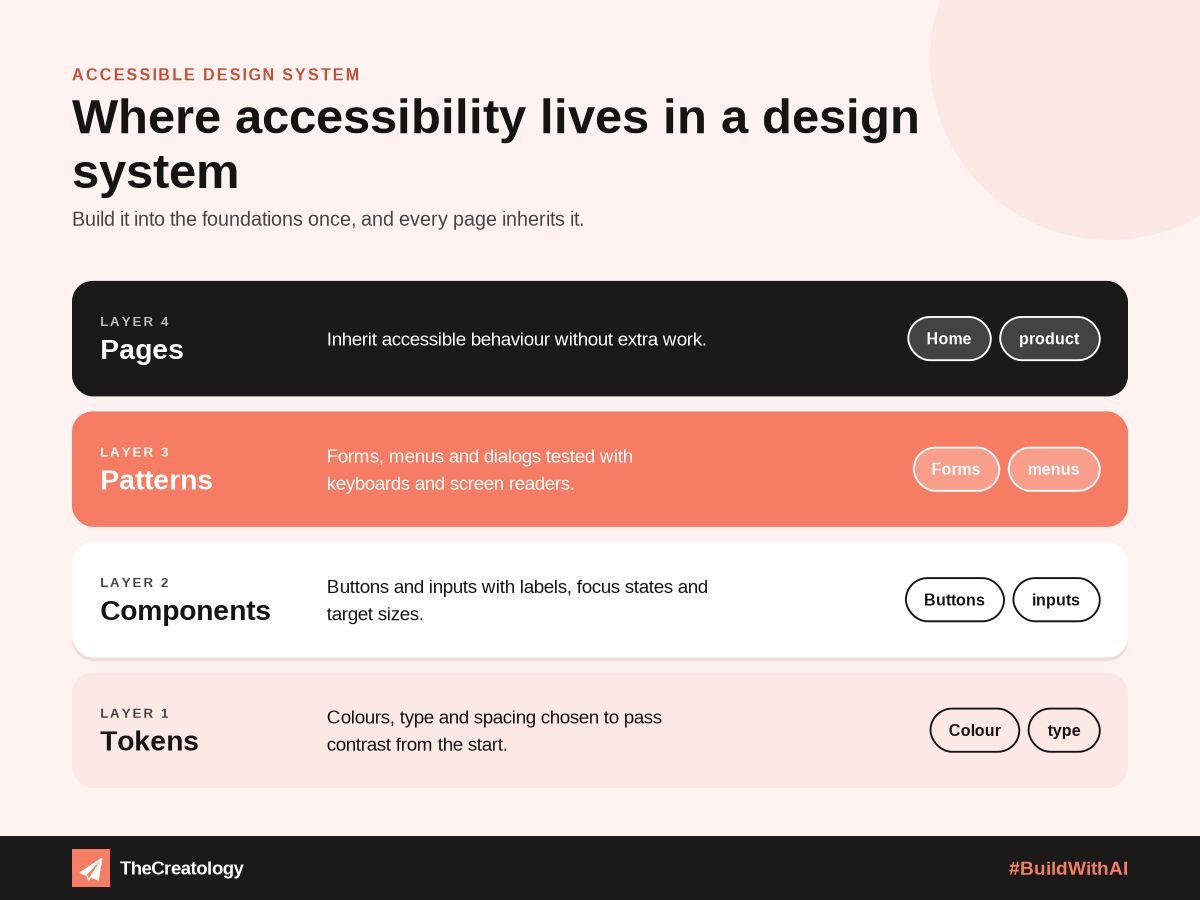
An accessible design system builds good habits into its smallest parts. For example, its colour tokens already pass contrast checks. Likewise, its buttons have clear focus rings, plain labels and large tap areas.
As a result, teams stop treating accessibility as a final audit. Instead, it becomes the default outcome of using the system.
Why Accessibility Leads the AI Era
AI now writes copy, lays out pages and builds whole screens. If the base parts are hard to use, AI just repeats those flaws at speed. In contrast, a strong base means every AI-built screen works for all from the start.
Moreover, clear, well-built pages are easier for search engines and AI assistants to read. Being open to all and being easy to find grow together.
Accessibility and the Six Pillars
An accessible system brings the first of our Six Pillars of Digital Intent, Space That Invites, to everyone. A space cannot truly invite people if some of them cannot enter. Our practical UX audit is a good place to begin checking.
Key takeaway: Build accessibility in once, and every page inherits it.
An Accessible Design System in a Real Example
Picture a small clinic website with a booking form. The team built each page by hand, so every form looks a bit different. Some buttons have no focus outline, and some fields have no labels. As a result, a person using a keyboard gets stuck halfway.
Now the team moves to an accessible design system. They fix the button and the input once, in one shared place. Then every form on the site gets the same clear focus ring and the same labels. Later, when an AI tool builds a new form, it uses those same parts. So the new form works for everyone from day one. Nobody had to remember to check it.
How to Build an Accessible Design System
- Start with tokens. Choose design tokens for colour and type that pass contrast from day one.
- Fix components centrally. Give every button, input and link clear focus states and labels.
- Test patterns with real tools. Try forms and menus with a keyboard and a screen reader.
- Write the rules down. Record your standards in a DESIGN.md file, so AI tools follow them too.
A Quick PageSpeed Tip
PageSpeed tip: Native HTML buttons, links and form fields are accessible by default. Using them, rather than custom scripted widgets, also keeps pages lighter and faster.
Frequently Asked Questions
Is accessibility only for people with disabilities?
No. Clear contrast, larger targets and simple language help everyone, especially on a phone in bright sunlight.
Can AI make a website accessible automatically?
AI can help find problems. However, it works best on top of accessible foundations, with people testing the results.
The Takeaway
Accessibility as infrastructure makes inclusion automatic, even as AI builds more of the web. Next, see how multimodal UI widens access through voice, touch and keyboard. At TheCreatology, we design spaces that invite everyone in.



Comments
Felt something? How about posting a comment below…